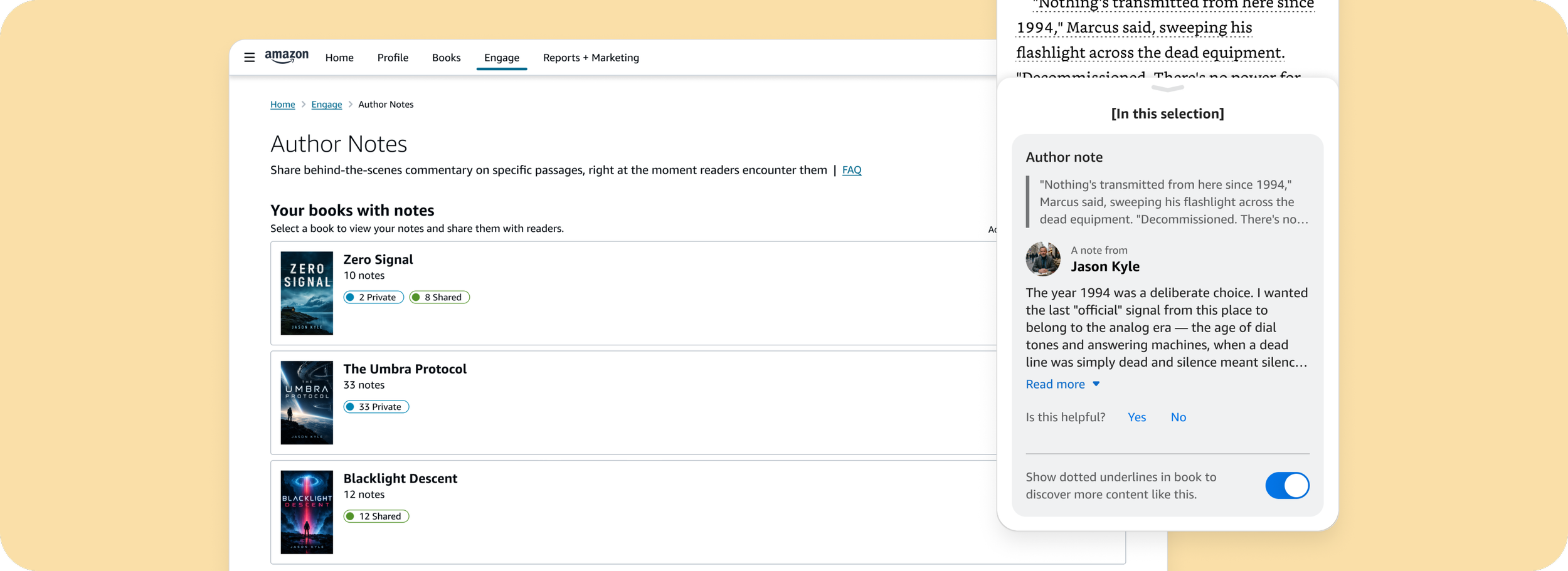
Author notes
Introducing Author Notes across Kindle platforms and Author Central (author’s management portal) — an end-to-end experience empowering authors to share behind-the-scenes commentary directly within ebooks, and boosting reader immersion, while creating a native engagement channel. Targeting a Q4 2026 launch.
Product
Author CX
Team
Books Design
Role
UX Design
Timeframe
2025 - 2026
Status
In experiment (target launch - Q4 2026)
The customer(s)
There are two sets of customers:
Kindle readers (primary): who consume digital books and want to dig deeperto learn more about the stories behind their favorite books
Authors (secondary): who have published books on Kindle and want to furtherengage with their readers through intimate knowledge about the books and craft
Problem / Opportunity
Engaged Kindle readers want to dive deeper after or while reading a book, but the insights and stories behind it are scattered or missing — and authors have no native way to reach their most invested readers. We can close that gap by enabling authors to share supplemental commentary directly within the Kindle experience, turning it into the start of a richer conversation.
Solution
By pairing author info directly with their recommended books on the detail page, the updated "About the author" card transforms into an active evaluation and discovery tool—helping readers effortlessly find an author's other work while leveraging Books' strongest conversion driver.
Customer benefits
The updated author widget puts one of the customers' most trusted discovery path right where they're deciding what to read next. Readers lean on authors as a discovery criterion, and pairing that with their other books, we meet customers with the connections they're already looking for—turning a static bio into a helpful path to their next read.
Insights
Research to understand customers’ needs revolved around asking several questions:
How do customers browse the store make their purchasing decisions?
How do customers evaluate and validate an author and their work?
What attributes of a book are most important or valuable?
What are customers’ perceptions of the detail page?
1.6k
Engagements per title in Goodreads Notes and Highlights
Goodreads feature similar to Author notes. Readers have engaged with over 516k likes and comments from 320 titles —indicating demand for engagement levers by readers.
75%
Top authors (by followers) on Goodreads participated in “Ask the Author” program
“Ask the Author” feature allows followers on Goodreads to post questions that authors respond to — signaling author’s interest in engaging with readers
47k+
Authors have published book recommendations
Author-generated book recommendations are published from the author portal and appear on the Amazon store — another signal of authors’ interest in engaging with readers.
Additional insights
For authors:
They're eager to embed supplementary material directly into books, so readers could access them in context without leaving — Currently, they resort to workarounds (e.g. linking to external websites) since Kindle doesn't natively support in-context supplementary material
They want creative control. They’re resistant to Amazon/Kindle creating their in-book content without explicit preview and approval
Anecdotes (from early usability study in 2025)
“Reading author notes makes me think about the book more deeply, because I'm thinking about why the authors made certain choices they made in a way that I typically wouldn't if I was just reading through something”
“Reading the author note helps you engage with the book, prevents you from zoning out. In fact, if you missed something that was pointed out in the author's note, you can go back to read that chapter or paragraph again.”
For readers:
They want resources clearly hand-selected by the author - not AI-generated content presented as authentic author-written work.
They want surface-level information available during reading, and deeper"rabbit-holing" when they actively seek it out.
They routinely leave Kindle to use external sites to find answers while reading - pulling them out and risking them not returning.
Explorations (Reader CX)
Scope and constraints:
Work within framework defined by Kindle team — i.e.
Surface author notes content in bottom sheet
Align to existing ingress affordance (dotted underline)
In-page view
Content to show within Author notes CX:
Highlighted passage by author
Author lockup
Author note
Explorations
Existing Kindle CX
Overflow view
Author notes inside Kindle
The reader-facing CX lives inside Kindle, so the feature needed to align to the existing UI and IA.
Therefore, everything outside the author note container was beyond our ownership. As such, the design task came down to defining the layout and specs for displaying the content.
Existing Kindle CX (Annotations feature)
Author notes inside Kindle
Similar to other existing supplemental content (e.g. Annotations), readers can see a full list of Author notes from the overflow menu.
For consistency, and despite a different set of content, the layout of the full list aimed to reflect the UI in other supplemental content pages.
Leading with the author lockup to utilize it as a header, giving the layout a structured hierarchy that adds context with each block of content the reader sees.
Insight: Feedback was given that the header “A note from...” throws the layout off-balance since the passage — rather than the note — is what follows the header.
Comment-like UI with the author note next to only an avatar.
Decision: This layout was a no-go as it requires identifying the author in the bottom sheet header — a space reserved for specific headers per Kindle’s guidelines.
Leading with the highlighted passage as the primary source of context. Showing author lockup above the note helps scale the layout to multi-author books to ensure the writer is identified first for context.
Insight: This layout presented the most logical flow of information.
Taking the direction in the option above and working with the Kindle team to align on an updated UI that utilizes patterns to drive consistency with the overall Kindle CX.
Explorations
Layout reflective of the direction taken with the reader-facing CX.
Insight: Vertical tab next to passage perceived to place too much focus on the passage vs author note and breaks up the block itself.
Scope: Taking notes on an author note isn’t in scope for MLP.
Tab placed next to entire content block for clearer visual distinction. Quill icon added to create visual separation between passage and author note.
Insight: Quill icon perceived as decoration rather than functional, and was advised to remove.
With quill icon removed, author name bolded to create visual distinction with the passage above. Spoiler guardrail added, aligning to WIP design from the Kindle team.
Explorations (Author CX)
Solution: To complete the experience and scale the feature, a self-service workflow in the author portal (Author Central) empowers authors to create their notes.
User flow - Author Central
About the design: As a new feature, we lacked value validation from a larger set of authors. Therefore, the MLP minimized tech effort with a more streamlined workflow backlogged until the product was proven out.
Scope and constraints (MLP):
Author portal for reviewing and publishing notes only
Creating and editing notes can only be done in Kindle
Authors must own their book to use this feature
Less streamlined end-to-end flow requires more clarity in onboarding content
First time user experience (Author notes main page)
Along with communicating the how and why of this new feature, the UX needed to lean heavily on the onboarding to proactively clarify the workflow which required navigating between Author Central and Kindle and to avoid authors getting stuck with seemingly dead-ends and errors.
Communicating value proposition, step-by-step guides, and best practices to provide as much helpful content and clarification upfront. A video tutorial was also proposed to offer a deeper dive on getting started.
High level feedback: Content and text-heavy, pushing the main CTA down the page to get started.
Hypothesis: Most traffic will come from announcement email which will have similar content explaining value props and how feature works. Content here may not need to take up so much space.
Author notes list view (Author notes detail page)
The Author notes detail page presents a list of all notes the author has created in the book, which they can either publish and edit. Publishing first submits the notes for moderation before they go live automatically, and editing redirects authors back to Kindle for web to revise their notes.
Books with notes populated (Author notes main page)
The main Author notes page serves as an ingress into the detail page of each book where publish and edit actions can be taken. As such, the focus of this page is to simply present the books with notes ready to publish. Onboarding content removed once authors have created their first notes.
Initial concept to show all books, by default, that the author has claimed (“claiming” a book validates the correct author of the book, linking the product on the Amazon store to the author’s account). A single CTA directs authors to the detail page (“View Author Notes”) or to Kindle for web (“Add Author Notes”) to create their notes.
Constraints: For MLP, 1) tech is unable to deep link into a specific book in Kindle, and 2) authors much own the book in their Kindle library.
High level feedback: Move away from showing all books by default to simplify the UI and work around the above constraints. Showing specific books as ingress gives incorrect expectation of landing on the book, which can be especially jarring if the author doesn’t already own the book.
The layout of each content block reflects the UI defined in the reader-facing experience with the book passage and author note. Given the limited actions allowed (edit and publish), the design task focused on laying out the actions at a bulk and individual note level. Initial designs took inspiration from email programs like Gmail to define an efficient UX.
Trimmed down onboarding content — summarized intro and value proposition, “how it works” in 3 steps instead of 5 — with all other need-to-know information placed inside FAQ at bottom of page.
High level feedback: Onboarding content is more digestible, but given the friction of the workflow due to tech constraints, this section needs more transparency and clarity. Empty state and CTA is still pushed too far down the page, which may detract authors from getting started quickly.
Hypothesis: Authors won’t necessarily read all this, but instead, they’ll just jump in and figure it out. So, how much info is enough?
Alternate UI showing books in list view with additional preview content on notes and statuses. Books with notes and books without notes are in separate views focus on available actions in each (manage notes vs go to Kindle to create notes).
High level feedback: Since all books that don’t have notes go to the same destination (Kindle library), why show them at all especially if the author doesn’t own the book already? Can we simplify the page UI further?
Final design (Reader CX)
The solution:
Kindle reading view: Dotted underline ingress triggers contextual bottom sheet without pulling readers out of their reading flow.
Kindle overflow view: Full-book annotations list — accessed from Kindle’s overflow menu — grouped by chapter for non-linear review of overall author commentaries.
About the design: Spoiler guardrail protects readers from engaging with potential spoilers. This is controlled by authors in the Author Central workflow.
Bottom sheet view - Author notes viewable in bottom sheet within reading experience.
All-up view - Alternatively from the bottom sheet, readers can see a full list of author notes within a book via Kindle’s overflow menu.
Author notes containing spoilers - Aligning to the supplemental content framework designed by the Kindle team, Author notes are blurred by default when they contain spoilers. The text is unblurred when readers tap “Read more”, signaling they consent to seeing the spoiler.
Author notes containing spoilers - Same as the bottom sheet within the reading experience, author notes containing spoilers are blurred by default. They’re unblurred when readers “Read more”, signaling they consent to seeing the spoiler.
Final design (Author CX)
The solution (Getting started): Streamlined 3-step “How does it work?” guidance with additional carousel for guided onboarding. Direct “Open Kindle for Web” CTA bridges Author Central and Kindle library flows.
About the design: Onboarding is expanded by default, but collapsable if authors choose to skip information.
The solution (Sharing notes): Consolidated view of books with active notes and status at-a-glance (Private, Shared, Needs Revision). This serves primarily as an ingress into the “detail page”.
About the design: Onboarding is collapsed by default in this view, but expandable if authors choose to review the information. This section is persistent on the page as an ongoing resource for authors.
Onboarding - Due to the additional steps and friction as a result of the need to navigate between platforms when creating and editing notes, more emphasis is needed in the onboarding to provide clarity on how the feature works.
When tech constraints are lifted in future iterations, onboarding content may be more simplified.
Author notes “detail page” with notes list - Bulk and individual share/unshare controls paired with inline word count and spoiler toggles for authors to review before submitting for moderation and sharing with readers.
For MLP, this page serves primarily as a review for authors before sharing. Once feature is proven successful, future iterations will consider note creation and editing functionalities within Author Central — streamlining the workflow and removing the need to navigate to Kindle for Web.
Author notes page with books list - For MLP, books without notes are not shown since deep-linking to specific books is unavailable, and doing so risks confusing authors when they navigate between Author Central and Kindle for Web.
When deep-linking is implemented, showing all books eligible for author notes can be considered as a feature enhancement.
Impact
Internal Beta test - This proposed new feature is set to launch in Q4 2026. Therefore, extensive quantitative and qualitative impact are not available at this time.
However, we launched an internal beta of the reader-facing CX (in Kindle) in Q3 2026, which generated the following results.
While this isn’t based on a large dataset, it provided us with some valuable initial feedback and signals.
Of 34 readers, 22 (65%) engaged wit author notes in their books. Of these 22 readers,
86%
Satisfied or very satisfied with the experience
86%
Felt more connected to the author
77%
Said it improved their reading experience
User anecdotes
This is super cool! I love hearing about what authors say regarding their writing and this is very unobtrusive way to add this content.
It really gave insight into the book and the author’s thoughts. More please!
When reading the author notes, I feel almost in the author’s head when they wrote the book, which increases the ready experience.
Interesting addition! Its cool to get backgroun into why an author added certain things or explaining references.
Learnings
Among the beta testers, the primary improvement that they suggested revolved around the ingress affordance:
7 of the 12 readers who didn’t engage with Author notes (58%), said nothing indicated notes were available
Those who did engage couldn’t tell which dotted underline has an Author note versus a popular highlight
This is a significant gap in discoverability. While we collaborated with the Kindle team on this UX, it ultimately lived outside the scope of our ownership - which factored into the later timeline to gather insight. Though this can continue to iterate, earlier testing would have provided valuable signals for the Kindle team to consider alternate options, and thereby, launch with a more confident solution.